
Blog Feature Overview
The portfolio includes a full-featured blog system with admin controls, scheduled publishing, and AWS backend.
Features
- Rich Content - Markdown with code highlighting
- Admin Dashboard - Create, edit, schedule, archive posts
- Scheduled Publishing - Posts publish at specified times
- Media Management - Image uploads with presigned URLs
- ISR Caching - Fast page loads with incremental regeneration
Architecture
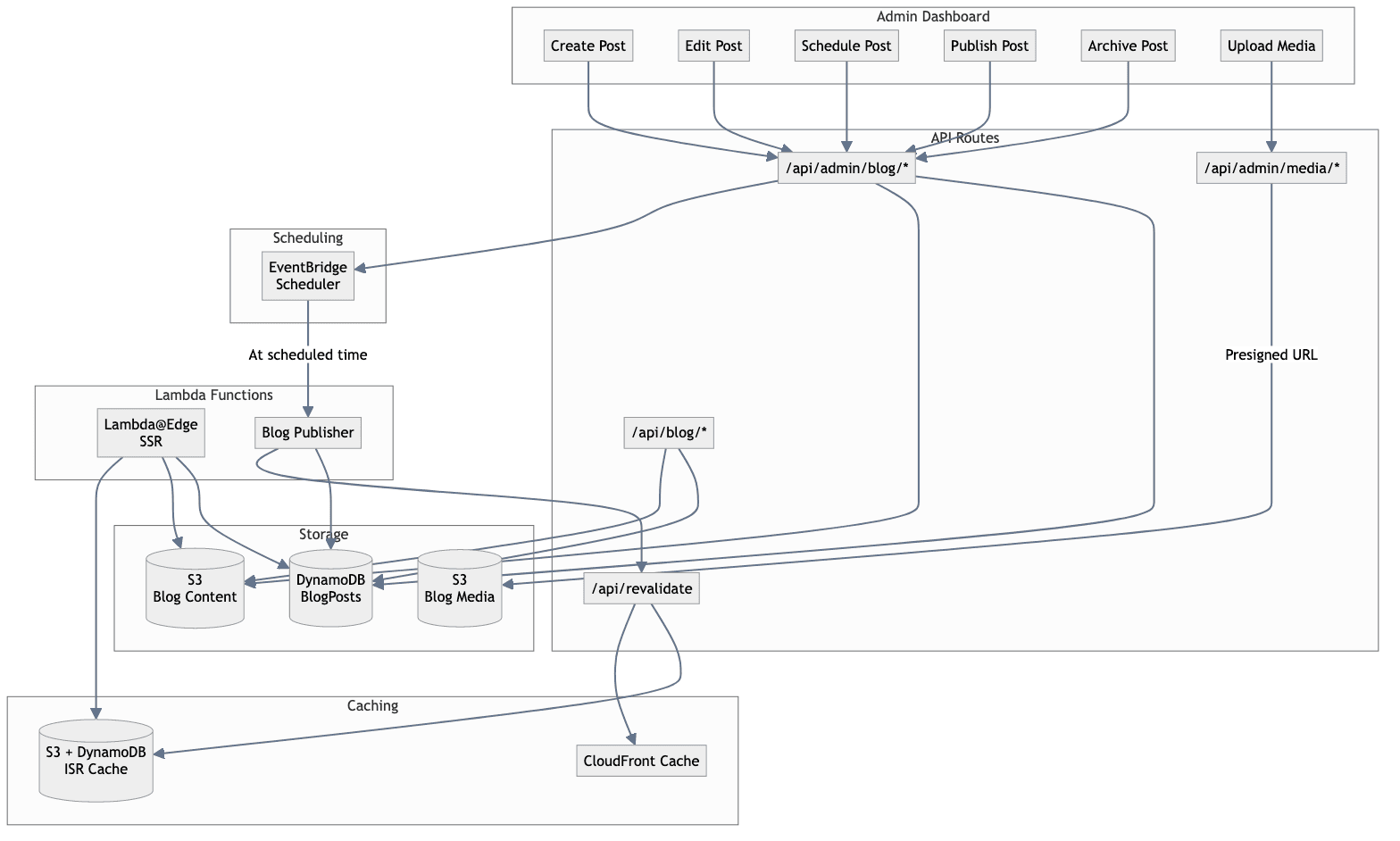
Data Model
Post Schema
| Field | Type | Description |
|-------|------|-------------|
| slug | String (PK) | URL-safe identifier |
| title | String | Post title |
| content | String | Markdown content (S3 ref) |
| excerpt | String | Short summary |
| status | Enum | draft, published, archived |
| publishedAt | ISO String | Publication timestamp |
| scheduledFor | ISO String | Scheduled publish time |
| tags | String[] | Post categories |
| coverImage | String | Media bucket URL |
Status Flow
draft ──┬──▶ published
        │
        └──▶ scheduled ──▶ published
                              │
                              ▼
                          archived
API Endpoints
Public
| Endpoint | Method | Description |
|----------|--------|-------------|
| /api/posts | GET | List published posts |
| /api/posts/[slug] | GET | Get single post |
Admin
| Endpoint | Method | Description |
|----------|--------|-------------|
| /api/admin/blog/posts | GET | List all posts |
| /api/admin/blog/posts | POST | Create post |
| /api/admin/blog/posts/[slug] | PUT | Update post |
| /api/admin/blog/posts/[slug] | DELETE | Delete post |
| /api/admin/blog/publish/[slug] | POST | Publish draft |
| /api/admin/blog/schedule/[slug] | POST | Schedule post |
| /api/admin/blog/archive/[slug] | POST | Archive post |
| /api/admin/media/upload | POST | Get presigned URL |
Scheduled Publishing
How It Works
- User schedules post via admin dashboard
- EventBridge schedule created via API
- At scheduled time, Lambda function triggers
- Post status updated to
published - ISR cache revalidated
EventBridge Schedule
{
  "ScheduleExpression": "at(2024-01-15T09:00:00)",
  "Target": {
    "Arn": "arn:aws:lambda:...blog-publish-function"
  }
}
Media Management
Upload Flow
- Client requests presigned URL
- Server generates URL with content type
- Client uploads directly to S3
- Media URL used in post content
Presigned URL Request
{
  "filename": "cover.jpg",
  "contentType": "image/jpeg"
}
Response
{
  "uploadUrl": "https://bucket.s3.amazonaws.com/...",
  "publicUrl": "https://cdn.example.com/media/..."
}
Admin Access
Authentication
Admin routes require:
- NextAuth.js session
- Email in
ADMIN_EMAILSlist
Configuration
# Comma-separated admin emails
ADMIN_EMAILS=admin@example.com,author@example.com
Cache Invalidation
On Publish
- DynamoDB updated
- ISR tag
postsrevalidated - Individual post tag revalidated
- CloudFront paths invalidated
Revalidation API
POST /api/revalidate
{
  "tags": ["posts", "post:my-slug"],
  "paths": ["/blog", "/blog/my-slug"]
}
Development
Fixture Mode
Use mock data during development:
BLOG_TEST_FIXTURES=true pnpm dev
Real Data
Connect to AWS resources:
# Ensure AWS credentials configured
BLOG_TEST_FIXTURES= pnpm dev
Related Documentation
- Infrastructure - DynamoDB and S3 setup
- Authentication - Admin access control
- Deployment - Production setup